
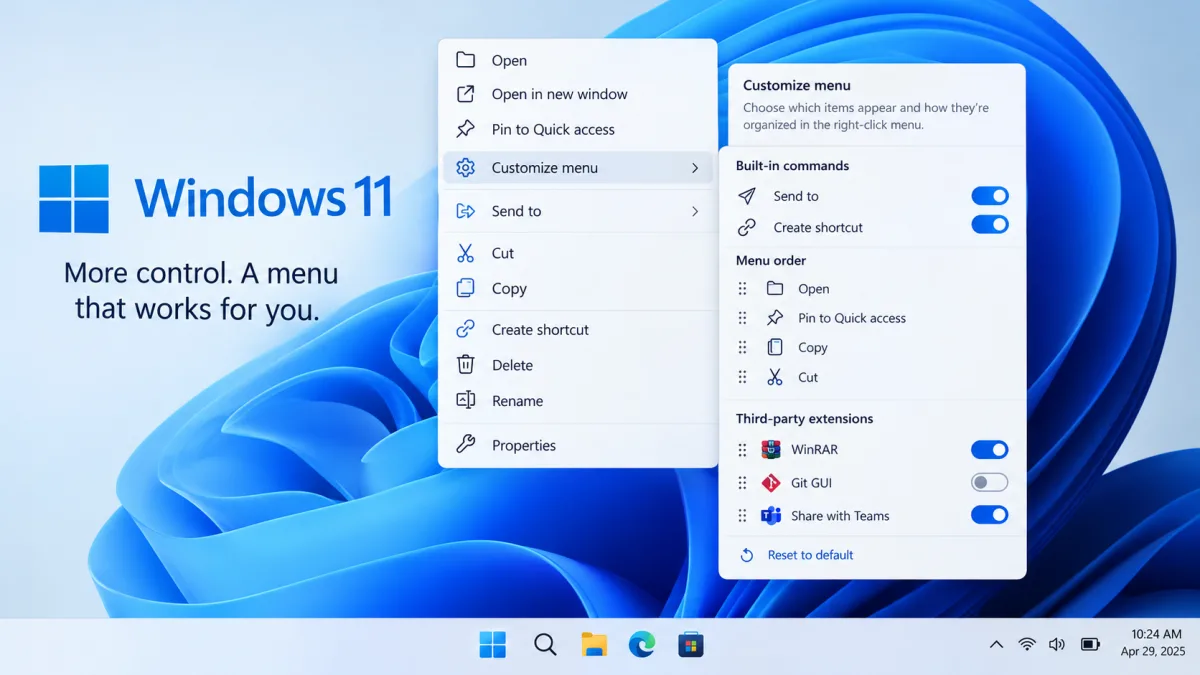
Microsoft is rolling out a new Windows 11 preview update that addresses one of the operating system’s most frustrating interface changes, the redesigned right click menu. The update introduces new customization options, allowing users to organize commands, remove unwanted items, and adjust the menu to better match their daily workflow.
The announcement comes as Microsoft reports its latest quarterly financial results, which indicate a continued decline in revenue from Windows licenses for new PCs. While the financial figures highlight challenges in the traditional Windows licensing business, the latest update demonstrates Microsoft's ongoing efforts to improve the Windows 11 user experience.
Windows 11 KB5127936 Introduces New Customization Options
The new preview update, identified as KB5127936, is a cumulative update for Windows 11 versions 26H2 and 25H2. Microsoft is introducing the update gradually, with a broader rollout expected once it becomes generally available.
The most significant addition is a new Customize Menu button that gives users greater control over the right click context menu. Instead of being limited to Microsoft's default layout, users can choose which commands appear and organize the menu according to their preferences.
This change is particularly useful for power users who rely on specific commands and frequently used tools to complete everyday tasks more efficiently.
Users Can Rearrange Commands and Remove Unwanted Options
The updated Windows 11 context menu offers several customization features designed to make common actions easier to access.
Users will be able to enable or disable built in commands, including Send To and Create Shortcut. They can also rearrange commands displayed in the main menu and manage third party extensions, choosing which items appear in the primary menu and which remain in submenus.
These improvements give users more flexibility when managing files, folders, and other items in Windows 11.
For people who regularly work with file management tools, productivity applications, and custom Windows utilities, the ability to control the right click menu could make everyday tasks faster and more convenient.
Microsoft Addresses a Longstanding Windows 11 Complaint
Since the introduction of the redesigned context menu in Windows 11, many users have criticized the changes to familiar commands and their placement.
Previously, some frequently used options were moved into a row of icons at the top of the menu, while other commands were hidden behind the Show more options entry. This design forced users to take additional steps to access tools they had used for years.
For experienced Windows users, these changes disrupted established habits and made certain routine actions less convenient.
Some power users turned to custom scripts, third party utilities, and other workarounds to restore a more familiar experience. The new customization feature aims to address these complaints by giving users more direct control over the menu's appearance and behavior.
A More Flexible Windows 11 Experience
The new right click menu customization feature represents a practical improvement for users who want greater control over their operating system.
Rather than forcing everyone to use the same menu structure, Microsoft is introducing options that allow individuals to tailor the interface to their needs. Users who prefer a simple menu can remove unnecessary commands, while those who rely on additional tools can keep their most important options within easy reach.
The update could also help improve productivity by reducing the number of clicks required to access frequently used commands.
When Will the New Windows 11 Feature Be Available?
Microsoft is initially distributing KB5127936 as a preview update through a gradual rollout. Availability may therefore vary between Windows 11 devices.
The company plans to move toward a broader release when the update reaches general availability. Users should check Windows Update regularly to see whether the preview update or its features are available on their devices.
As the rollout continues, the customizable context menu could become a welcome improvement for Windows 11 users who have been asking for a more flexible and familiar right click experience.
Final Thoughts
Microsoft's latest Windows 11 preview update addresses a long standing complaint by giving users more control over the right click menu. With options to manage built in commands, rearrange menu items, and control third party extensions, the new feature makes the operating system more adaptable to individual preferences.
For users who have struggled with the redesigned context menu, this update could make everyday Windows tasks more intuitive and reduce the need for third party customization tools.